Romi Vision
There are various Strategies for Vision Programming that we can use. The strategy that we'll make use of is the Raspberry Pi as a co-processor which uses the WPILibPi library for vision processing.
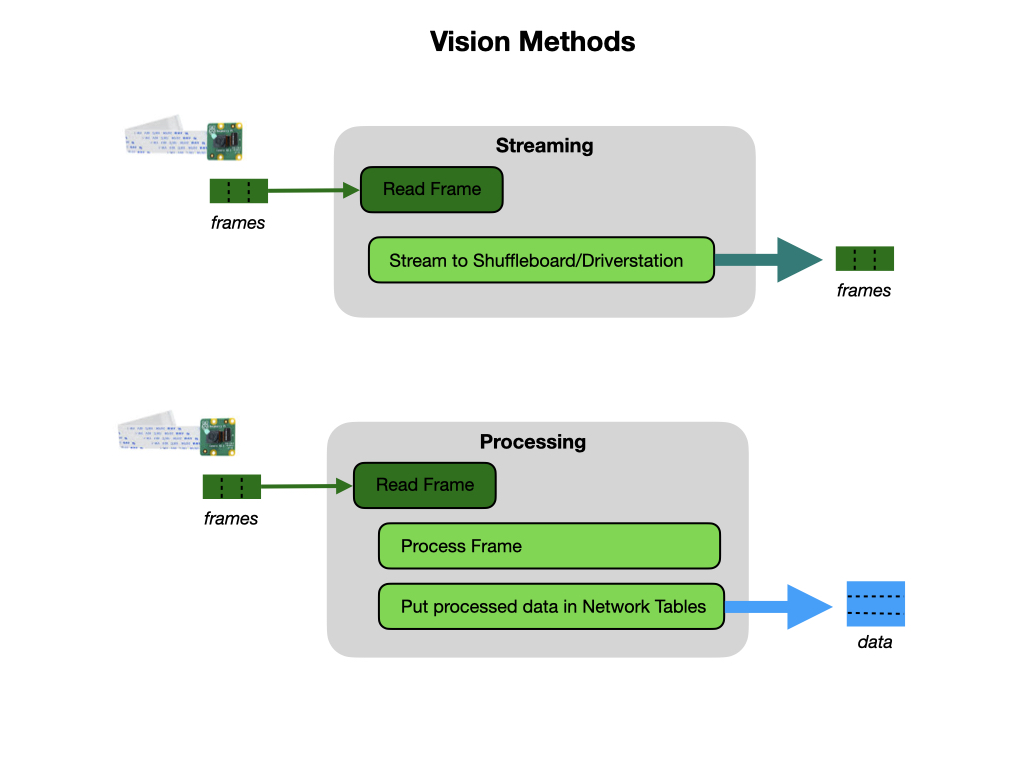
We will use the camera for two purposes:
-
Streaming - This method involves streaming the camera to the Driver Station so that the driver and manipulator can get visual information from the robot’s point of view.
-
Processing - Instead of only streaming the camera to the Driver Station, this method involves using the frames captured by the camera to compute information, such as a game piece’s or target’s angle and distance from the camera.
On the FRC game field they will use Retroflective tape and April Tags to identify targets. We'll use Image Processing to determine the location and distance of the target and act accordingly. Image processing can be done using either Limelight or PhotonVision. PhotonVision is open-source and can be used with the RaspberryPi camera on the Romi or with the Limelight camera. On the competition robot PhotonVision is usually used with a standard USB camera, although it can also be installed on the Limelight camera. The Limelight image processing software can only be used on the Limelight. We use the Limelight software and camera for our competition robot.
In this section we'll use PhotonVision with a RaspberryPi camera to sense our surrounding environment and extract relevant information. Once the information is extracted it can be used to control the robot. We'll start by learning how to use the RaspberryPi camera on the Romi to view a basic camera stream.